One page where every employee finds their policies
What is waiting for them and by when, what they have already confirmed, and every policy that applies to them. At your organization's own address, in your logo and color, with no account and no password.
The portal is the other half of policy acknowledgement. Cycles ask people to confirm. The portal is where they find the policy again in March, where the new hire confirms the onboarding cycle, and where the intranet link points.
What an employee sees
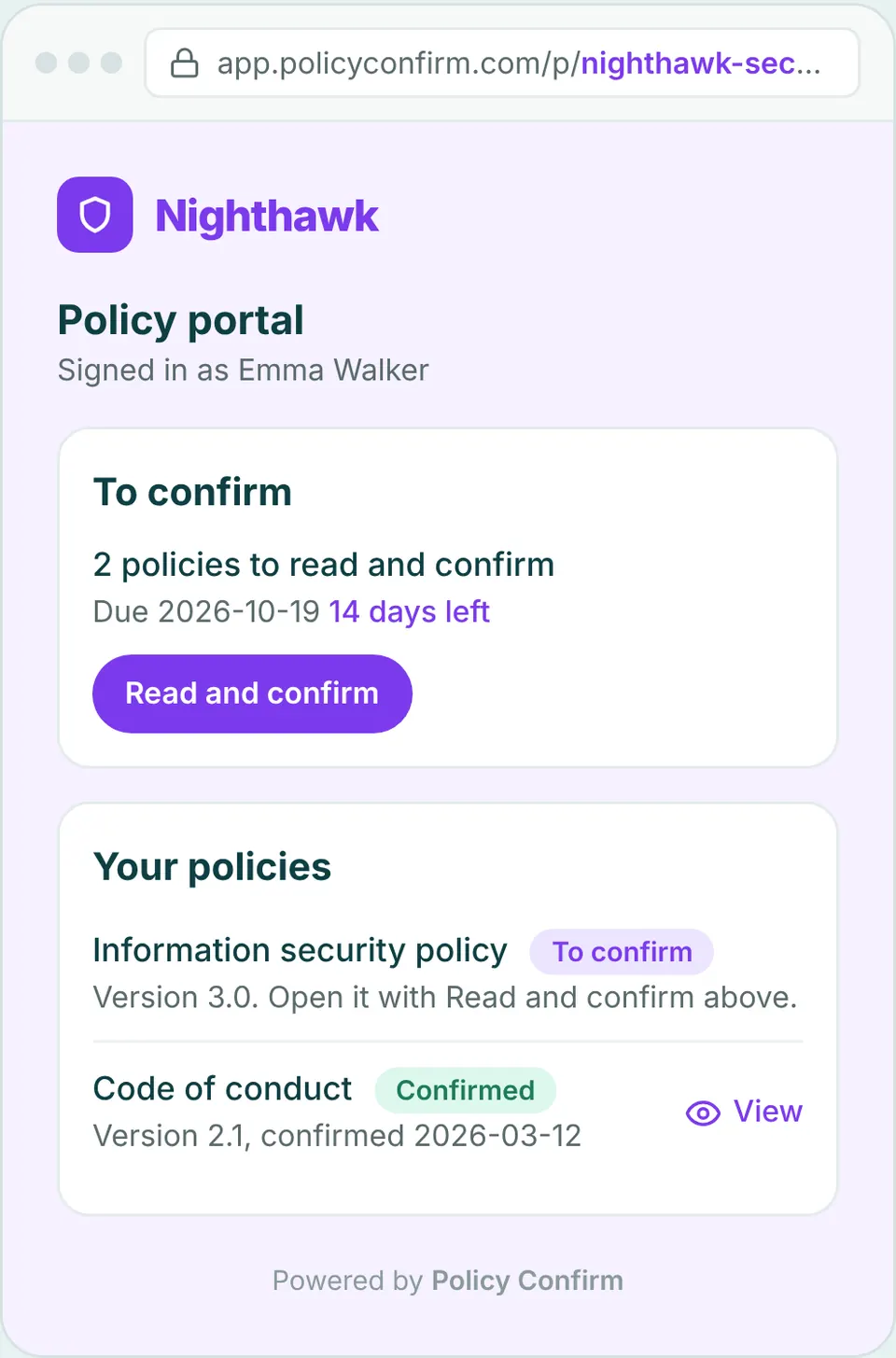
Three sections, in the portal's own words. The copy in the preview above is the copy your people get.
To confirm
Everything still waiting for the person, each with its deadline. Read and confirm takes them straight to the confirmation page, already signed in.
Your policies
Every policy that applies to them now, the version they confirmed and when. A policy with a newer version than the one they confirmed is marked New version.
Additional company policies
The optional ones the organization has made available: the travel policy, the style guide, the things worth having in one place without a confirmation.
Make it yours
A policy portal is only used if people trust it, and they trust what looks like theirs. Everything an employee sees, from the sign-in page to the confirmation, carries your organization's name.
One address, yours to choose
app.policyconfirm.com/p/your-company. Link it from the intranet, the onboarding checklist or a Teams tab. Change the address later and the old one sends people on.
Your logo and color
The portal, the sign-in page and the confirmation page carry your logo and accent color, so they read as part of your own tools rather than a vendor's.
Sign in with a one-time code
People enter their work email and get a code. No password, no account to create, and only active recipients in your organization get in.
A question goes to the right person
The sign-in page can show an email address for questions, so a policy question lands with your compliance or HR contact and not with us.
Where it fits in how you already work
The portal does not change your process. It gives the process a front door that is the same for everyone, however they were added and wherever the document lives.
The new hire in week three
The portal shows what a cycle has asked of a person, so a new hire sees their policies once they are in one: an onboarding cycle for new starters, or the running cycle if they are added to its group. Their deadline is their own, and the portal is where they confirm.
Policies that live in SharePoint
A policy can link to its page in SharePoint or on the intranet. The portal lists it, the person reads it where it lives, and the confirmation is recorded against the version.
Six months after the email
Someone needs the expenses policy in March and the email from October is long gone. The portal is the place that is still right, with the current version at the top.
Cycles, deadlines per person, reminders and the record are described under How it works. The portal shows the same data from the employee's side.
Frequently asked questions
What is an employee policy portal?
A page at your organization's own address where each person sees the policies that apply to them: what is waiting to be confirmed and by when, what they have already confirmed and which version, and the optional policies the organization has made available. In Policy Confirm it is part of the same system that runs the acknowledgement cycles, so what the portal shows and what the record says are the same thing.
Do employees need an account or a password for the policy portal?
No. They enter their work email and receive a one-time code. There is no password and no account to create, and only active recipients in the organization can sign in.
Can we link the policy portal from our intranet or Teams?
Yes. The portal has one address, for example app.policyconfirm.com/p/your-company, which you can link from the intranet, an onboarding checklist or a Teams tab. If you change the address later, the old one redirects.
Does the portal replace the email with the policy?
No. Every recipient still gets their own email with a personal link when a cycle goes out, and reminders go by email. The portal is where they go afterwards: to find a policy again, to see what is still waiting, or when the link from the intranet is the way they always get there.
Can the portal carry our own logo and color?
Yes. The portal, the sign-in page and the confirmation page use the logo and accent color set under your organization's settings, and the same branding is used in the emails.
Is the policy portal included, and how is it turned on?
It is part of Policy Confirm for every organization. It is off until an owner turns it on under Settings, where the address, the logo and color, and the contact email are set.
Give your people one place for their policies
Free for up to 10 recipients. Turn the portal on under Settings, set your address, logo and color, and link it from the intranet.