October 2026 release: a policy portal for every employee, and a deadline for every person
Originally published:
Last updated:
This is a big one. Your people get a policy portal of their own, where every policy that applies to them is one link away. Cycles get a deadline for each person instead of one end date for everyone, and they tell you who is overdue. And when a cycle goes out, Teams or Slack can say so in the channels people already read.
Policy Confirm has always been good at the moment a policy goes out: send it, follow up, record who confirmed. This release is about the rest of the year. Where do people find a policy six months later? What happens to the person who joins three weeks into a cycle? Who is actually late? Here is what changed.
A policy portal for every employee
Your organization can now have its own address, for example app.policyconfirm.com/p/your-company, where people find every policy that applies to them. Link it from the intranet, the onboarding checklist or a Teams tab, and it stays the right place to look long after the email is gone.
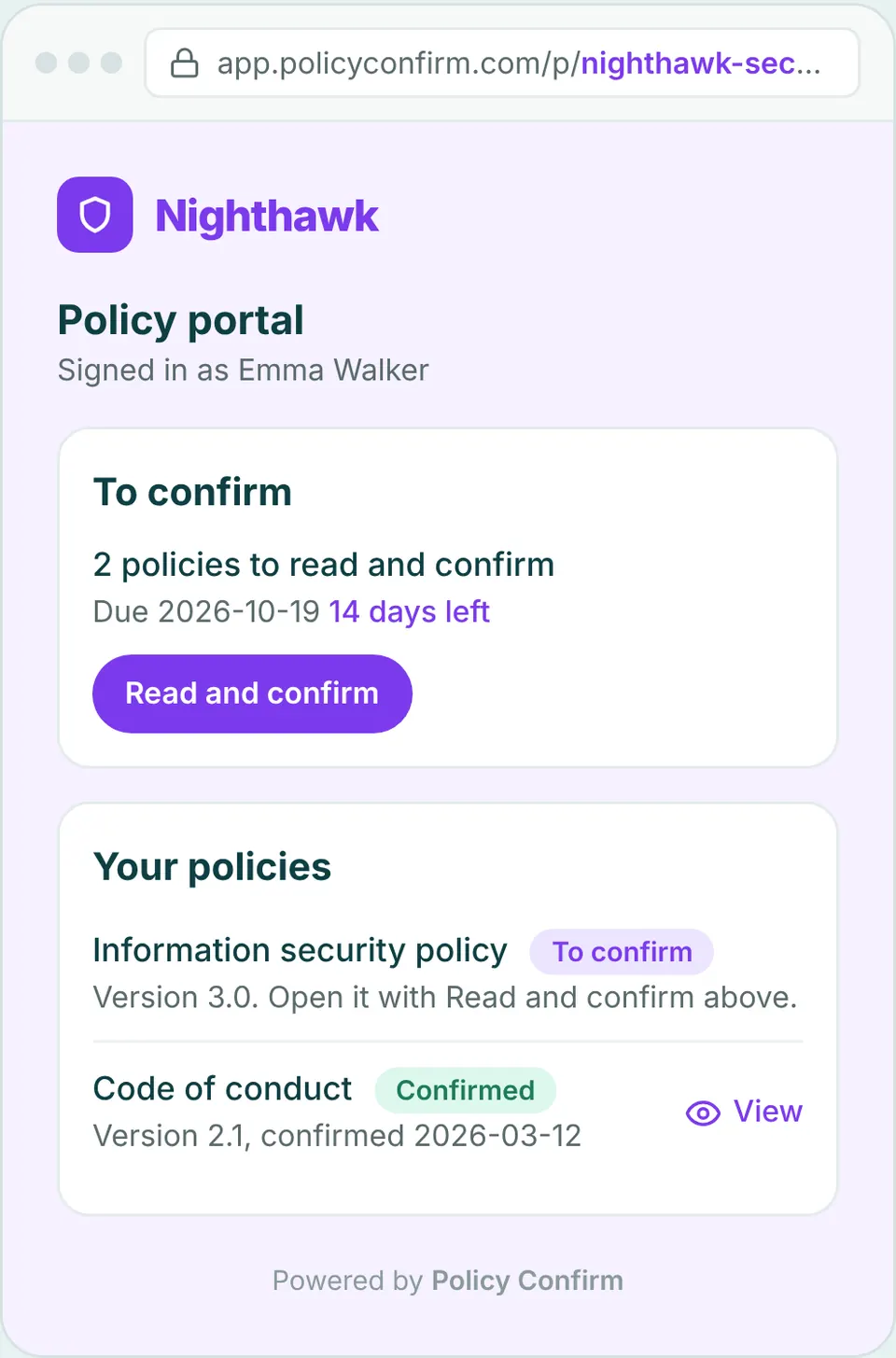
- To confirm shows everything still waiting for the person, with their deadline. Read and confirm takes them straight to the confirmation page, already signed in.
- Your policies lists every policy that applies to them now, the version they confirmed and when. If a policy has a newer version than the one they confirmed, it is marked New version.
- Additional company policies holds the optional ones your organization has made available.
People sign in with their email and a one-time code. No password and no account to create, and only active recipients in your organization get in. The portal carries your logo and color, and can show an email address for questions on the sign-in page. If you change the address later, the old one sends people on. The portal is off until an owner turns it on under Settings.
A deadline for every person, and Overdue when someone misses it
A cycle used to have one end date. That works for an annual round, and falls apart for the person who joins in week three and gets four days to read the same policies everyone else had a month for. New cycles now give each recipient their own deadline: a number of days to confirm, counted from the day that person is added.
- Overdue. The cycle shows as Overdue while anyone is past their deadline, and the cycle page shows who and by how many days. An optional email goes out the day after a deadline, and supervisors see each person's deadline and an overdue count.
- Include new recipients automatically. People who join a group, or are added to a policy, while the cycle is open are included, each with their own deadline.
- Skip and exclude. Leave out people who recently confirmed the current version, named recipients, or whole groups.
- Sync and remove. Sync recipients adds anyone missing from a running cycle, and the bin icon removes someone.
- Use recommended settings turns on the usual setup in one click.
Cycles created before this release keep their end date and work as before. Combined with scheduled send and cycles without an end date from last month, one cycle can now run all year and treat a new hire in November exactly like everyone else in January.
Cycle notices in Teams and Slack
When a cycle goes out, Policy Confirm can post a short message in the Teams and Slack channels you choose, with a link to the policy portal. A channel message gets seen in places an email does not, and it tells people the request in their inbox is real. Everyone still gets their own email, and reminders still go by email.
You write the title and the message, and can add a line with the deadline and a line with the portal link. Add as many channels as you need, send a test message to each, and see a preview before anything goes out. Set it up under Settings.
Keep policies where they already live
A policy document no longer has to be a PDF in Policy Confirm. Point it to a link, for example the page in SharePoint or on the intranet where the policy is kept today. For a document Policy Confirm cannot open, choose Stored elsewhere and write where it is. Recipients see that note instead of a View button. Either way, the confirmation is recorded against the version, the same as for an uploaded file.
A new policy page, comments, and the quiz for everyone
The policy page has a clearer layout. The details sit in one card, and Policy versions and Quiz have their own sections. Click the status badge to change the status, and the version recipients open is marked Current. The quiz, questions a recipient must answer before they can confirm, is now available to every organization.
Internal notes have become comments, with who wrote them and when, so the people working on a policy renewal can do it on the policy itself. The Policies list shows how many comments each policy has. Anything you wrote as a note before is kept as the first comment.
Proofs for the people you choose
A proof used to cover one cycle. It can now cover chosen people or groups, with what they confirmed in every cycle. Download one PDF or CSV for everyone, or one per person. That is the answer when a customer asks about one team, or head office asks about one site.
Bulk upload and export
- Policies. Create many policies at once from an Excel or CSV file, or export the policy list to Excel. Both are in the three-dot menu on the Policies page.
- Recipients and groups. Download them to Excel from the three-dot menu on the Recipients page.
Why this release
Most organizations do not run policy acknowledgement as one big event a year. People join and leave every month, policies change when they need to, and the documents live wherever they have always lived. This release is built for that: one place for employees to look, a deadline that is fair to each person, a nudge where people already are, and no need to move your documents first.
Frequently asked questions
What is the policy portal?
It is a page at your organization's own address where each person sees the policies waiting for them, with their deadline, and every policy that applies to them with the version they confirmed. They sign in with their email and a one-time code. An owner turns it on under Settings.
Do recipients need an account to use the policy portal?
No. They enter their email and get a one-time code. There is no password and no account to create, and only active recipients in your organization can sign in.
How do deadlines work for someone who joins in the middle of a cycle?
In cycles created from this release on, each recipient gets a number of days to confirm, counted from the day they are added. Someone added three weeks in gets the same number of days as everyone else.
Do Teams and Slack messages replace the email?
No. The channel message announces the cycle and links to the policy portal. Every recipient still gets their own email, and reminders still go by email.
Can a policy stay in SharePoint instead of being uploaded?
Yes. Set the policy document to a link, for example to SharePoint, or choose Stored elsewhere and write where the document is kept. Confirmations are recorded against the version in the same way as for an uploaded file.
Get started. Free up to 10 recipients.
Give everyone one place for their policies, and a fair deadline to confirm them.
Get startedAbout the author
The team behind Policy Confirm has hands-on experience across full-stack development, product growth, compliance leadership, and executive technology roles such as CTO and CPTO. They have led and supported ISO 27001 implementations, policy governance initiatives, and audit-driven compliance projects in regulated environments. This background informs a practical, audit-oriented approach to policy management and policy acknowledgements.
Related content
- September 2026 release: one record per person, and your brand on every request
- How to automate policy distribution when onboarding new employees
- July 2026 release: Recurring cycles, supervisors, and full coverage
Legal disclaimer
The information provided in this article does not, and is not intended to, constitute legal advice; instead, all information, content, and materials available on this site are for general informational purposes only. You should contact your attorney to obtain advice with respect to any particular legal matter.