How to build a policy approval workflow that keeps decisions clear
Originally published:
Last updated:
A policy approval workflow defines who reviews a policy, who has authority to approve it, which version they approve, and what happens next.
A useful process should answer three straightforward questions: What was approved, who approved it, and when? It should also keep unfinished or rejected policies out of employee distribution.
For many organisations, the workflow can be simple. One policy owner prepares the document, the right person signs it off, and the approved version is distributed to the people who need it.
The difficulty starts when those decisions become separated from the document.
Where policy approvals lose clarity
A manager replies “looks good” to an email. Someone makes a final edit. Another person uploads the file to a shared folder. A month later, nobody is sure whether the published version was the one the manager reviewed.
The approval may have happened, but the record is difficult to interpret.
A clear workflow connects the decision to a specific policy version. It also gives everyone involved a common understanding of what each status means.
Policy approval vs employee acknowledgement
Policy approval records an authorised person’s decision that a particular policy version is ready for use.
Employee acknowledgement records an employee’s confirmation in relation to the policy version they received.
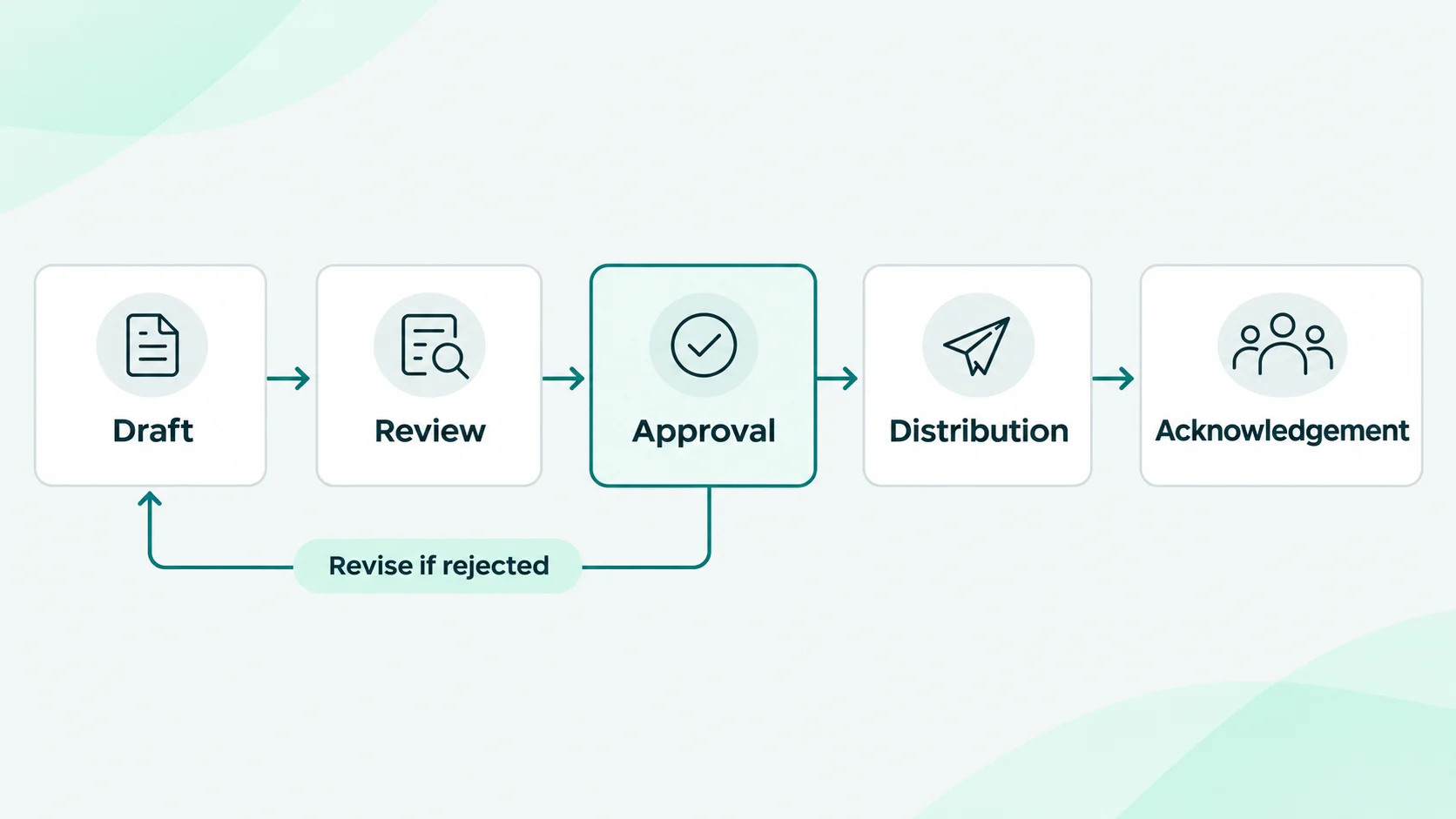
These are separate steps:
- Review: Is the content accurate, workable and complete?
- Approval: Is this version authorised for use?
- Distribution: Who needs the policy, and when?
- Acknowledgement: Has each required recipient confirmed the issued version?
An approval does not show that employees received the policy. An acknowledgement does not replace the organisation’s approval decision or, on its own, prove understanding.
A practical policy approval workflow in six steps
1. Assign a policy owner and an approver
Give one person responsibility for preparing the policy and managing revisions. Then identify the person with authority to approve it. Depending on your organisation, that might be a department head, executive or another designated decision-maker.
Keep specialist review separate from the final decision. HR, IT or legal may contribute comments without each needing to become a formal approver.
For a small organisation, one final approver may be sufficient. If your governance rules require several approvals, document that requirement and choose a process that supports it.
2. Finish the review before requesting approval
Use the review stage to resolve open questions. Before requesting sign-off, check that:
- The purpose and intended audience are clear.
- Responsibilities are assigned to real roles.
- Instructions reflect how the organisation operates.
- Related policies do not contradict it.
- The proposed effective date is realistic.
- The document has a clear version identifier.
The approver should receive a decision-ready document, not a draft with unresolved comments.
3. Identify exactly what is being approved
The request should identify the policy and its version, with access to the document under review.
Avoid relying on a link to a file that can be silently overwritten. If the content changes materially during approval, return it for review and seek approval for the revised version.
“Information Security Policy, version 3.2” is easier to trace than “final policy.”
4. Record the decision clearly
A useful decision record includes:
- Policy name and version.
- Approver identity.
- Approval or rejection.
- Decision date and time.
- A reference to the document reviewed.
- The reason for rejection, where applicable.
Agree what happens after a rejection. Usually, the owner revises the document and submits a new request. Keeping the earlier decision helps explain why the policy changed.
5. Plan distribution separately
Approval confirms that the content is authorised. Distribution determines who receives it and when.
You may need to coordinate a policy change with training, a new system or an operational change. Do not assume that approval always means immediate release.
When the policy is ready to go out, define the audience, acknowledgement deadline and follow-up process.
6. Preserve the history when the policy changes
A new version should have its own review and approval decision where your process requires it.
Keep earlier approvals and employee acknowledgements associated with their original versions. This makes it possible to understand which policy applied at a particular point in time without reconstructing the history from old emails.
Example: updating a remote-working policy
An organisation changes its rules for remote access. The policy owner prepares version 2.0. IT reviews the access requirements, and HR checks that the wording is consistent with working arrangements. The designated approver then reviews the completed document.
If the approver rejects a section, the owner revises it and requests approval again.
Once approved, the administrator schedules distribution for the relevant employees. The approval record identifies the authorised version. Each employee’s acknowledgement is recorded separately.
The important point is that the review, decision and employee communication remain traceable.
How policy approvals work in Policy Confirm
Policy Confirm provides an optional approval step before a policy becomes active.
A request can contain several policies and goes to one approver. The approver opens an email link and verifies access with a one-time code, without creating an account. Each policy is approved or rejected individually, and rejection requires a reason.
The request preserves the version and document details associated with the decision. You cannot approve your own request.
Approval does not automatically send the policy to employees. An approved policy becomes active, and you decide when to distribute it through a cycle. Employee confirmations remain a separate record tied to the issued version.
Frequently asked questions
Can policy approvals be handled by email?
Yes. Email can support a simple process if the decision, approver, date and exact document version are retained together. The practical challenge is maintaining that connection when documents change or several people contribute.
Who should approve a company policy?
The person or body authorised by your organisation’s governance arrangements. Choose an approver with the authority and context to make the decision, rather than automatically assigning every policy to the same person.
Does every edit need a new approval?
Define this in your policy-management process. A formatting correction may be handled differently from a change to responsibilities or requirements. In Policy Confirm, when approvals are enabled, a new policy version needs approval before it becomes active.
Does policy approval prove compliance?
An approval record demonstrates a decision about a policy version. Compliance also depends on the policy’s content, its implementation and the obligations that apply to your organisation. Software cannot make that determination on its own.
Start with one policy
Choose a policy that is due for review. Name its owner and approver, identify the version under review, and decide how the approved document will reach employees.
If you can retrieve the approval and acknowledgement records without searching through several inboxes, you have a process you can repeat.
See how Policy Confirm connects policy distribution and acknowledgement.